

Fleet: Holding Many Streams
The cognitive load of solo operation scales super-linearly with concurrent streams. Two clients are not twice as hard as one. They are three times as hard, because you spend a third of your time context-switching.
Fleet is StellarView’s answer to this problem.
The Problem
A Modern Principal with four active client galaxies needs:
- Four development environments
- Four sets of credentials
- Four deployment pipelines
- Four monitoring configurations
- Four context switches per day
Without Fleet, this means four terminal tabs, four AWS console tabs, four .env files, and a mental model that leaks across boundaries.

The Fleet Architecture
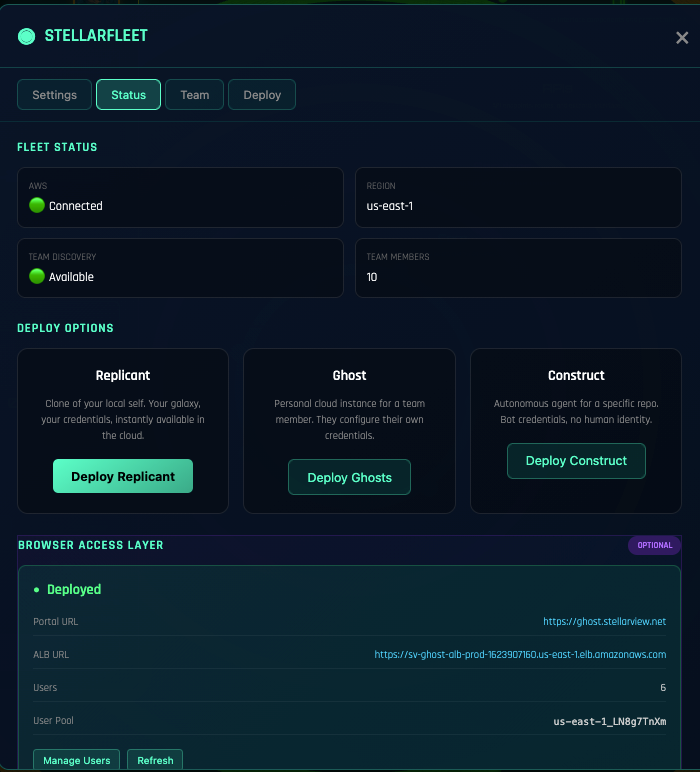
Fleet manages three tiers of cloud resources:
Ghost: Development Environments
A Ghost is a headless StellarView instance running on AWS ECS Fargate. Your development environment in the cloud, accessible from any browser through the Transporter Room.
Each galaxy can have its own Ghost. SolarScore’s Ghost has a PostgreSQL RDS instance, a Redis cache, and the SolarScore application running in development mode. WaltersFL’s Ghost has a different configuration entirely, static site hosting with CloudFront.
Fleet Status:
 Ghost: solarscore-dev [running] Fargate / us-east-2 4GB RAM
 Ghost: waltersfl-dev [running] Fargate / us-east-2 2GB RAM
 Ghost: propmgmt-dev [stopped] (last active: 3h ago)
 Ghost: practicai-dev [running] Fargate / us-east-2 2GB RAM
Replicant: Production Deployments
When a galaxy’s code is ready for client review or production, Fleet creates a Replicant, a production-configured deployment of the application.
Replicants are deployed from a specific branch or tag. They have their own domain, their own SSL certificate, and their own monitoring. The client sees a clean URL, not a development environment.
Construct: Infrastructure
The underlying AWS resources: VPCs, subnets, security groups, RDS instances, S3 buckets, CloudFront distributions. Fleet manages these through Terraform, provisioning and destroying as galaxies start and stop.
The key principle: infrastructure follows the galaxy. Create a galaxy, and Fleet provisions the infrastructure. Archive a galaxy, and Fleet tears it down. No orphaned resources. No forgotten EC2 instances running at $200/month.
The Transporter Room
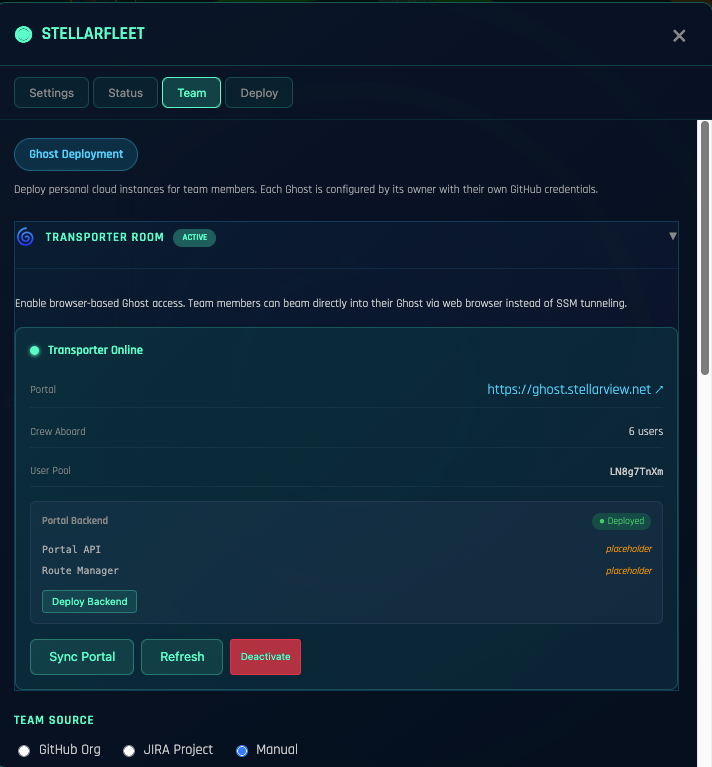
Team members access Ghost instances through the Transporter Room, a Cognito-authenticated web portal. No SSH keys. No VPN. No local development setup. Open a browser, authenticate, and you are in the Ghost’s terminal.
This changes the onboarding equation. A new team member does not need:
- A powerful laptop with 32GB RAM
- Docker installed and configured
- Node.js, Python, and Ruby version managers
- AWS CLI credentials
- Three hours of README-following
They need a browser and Transporter Room access. Five minutes to productive.
Context Isolation
The most important thing Fleet does is not technical. It is cognitive. Each galaxy’s Ghost is a complete, isolated world. When you switch from SolarScore to WaltersFL:
- Different codebase
- Different database (different schema, different data)
- Different credentials (different GitHub token, different JIRA space)
- Different deployment target
- Different client context
The switch is instant. Click the galaxy in the sidebar. Fleet handles the rest. Your mental model does not need to unload SolarScore and load WaltersFL. Fleet ensures you cannot accidentally cross-contaminate.
The Economics
Four traditional development environments:
- 4 × developer laptop (already owned)
- 4 × local Docker instances (free but heavy on RAM)
- 4 × manual AWS setup (hours of Terraform writing)
- Ongoing: orphaned resources, forgotten instances, surprise bills
Four Fleet-managed environments:
- 4 × Fargate tasks (~$15/month each when running, $0 when stopped)
- Auto-provisioned infrastructure (Terraform managed by Fleet)
- Auto-teardown on inactivity (Ghost stops after 15 minutes idle)
- Zero orphaned resources
The Ghost’s idle timeout is the key. SolarScore’s Ghost runs during business hours when you are actively developing. At 6 PM, it stops. At 8 AM, it starts. You pay for 10 hours, not 24.
Fleet + Miracle Mode
The real power: Miracle Mode runs on a Ghost. Not on your laptop. Not tying up your local resources overnight.
Queue a Miracle run on the SolarScore Ghost at 5 PM. Go home. The Ghost runs the epic, analyzing, executing, committing, pushing. When every phase is done, it stops. You wake up to PRs and a $0.40 compute bill.
While SolarScore’s Miracle runs on its Ghost, you can run WaltersFL’s Miracle on a different Ghost. Concurrent execution across galaxies, none of it touching your laptop.
Getting Started with Fleet
- Configure AWS credentials. Fleet needs an IAM role with ECS, RDS, S3, and VPC permissions
- Launch a Ghost
Fleet → New Ghost → select galaxy → choose instance size - Connect via Transporter Room, authenticate, open the terminal, you are in
- Deploy a Replicant
Fleet → Deploy → select branch → configure domain - Monitor. Fleet dashboard shows all instances, costs, and activity
The infrastructure follows the practice. Not the other way around.
Explore Fleet: Open the Fleet panel in StellarView’s workspace shell. Launch a Ghost for any galaxy.